
On this page
- Four ways to reach an audience
- Staff messages belong to the Workforce audience
- Member communications separate recipients from channels
- News visibility is different from a targeted delivery
- One person can belong to both audiences
- Available screens depend on access
- Reading, acknowledgement, and signature are different results
- What delivery indicators can tell you
- Example: a shift handover question
- Example: a staff safety policy
- Example: a member dinner notice
- Related guides
- Keep the audience and result together
Four ways to reach an audience
- Staff conversation: Workforce Messages → Chats. Direct and group conversations involve their participants; department conversations follow department access. Best for questions and back-and-forth coordination.
- Staff broadcast: Workforce Messages → Announcements. The audience is all departments or one employee department. An announcement can require acknowledgement or a typed signature.
- Member broadcast: Club Admin’s Member Communications or Communications Hub. Recipients are member audiences, with channels chosen separately. Best for a notice addressed to members.
- Public or member news: website news has its own publication status and visibility. Member Only makes website copy member-facing; it does not make the post staff-only.
Staff messages belong to the Workforce audience
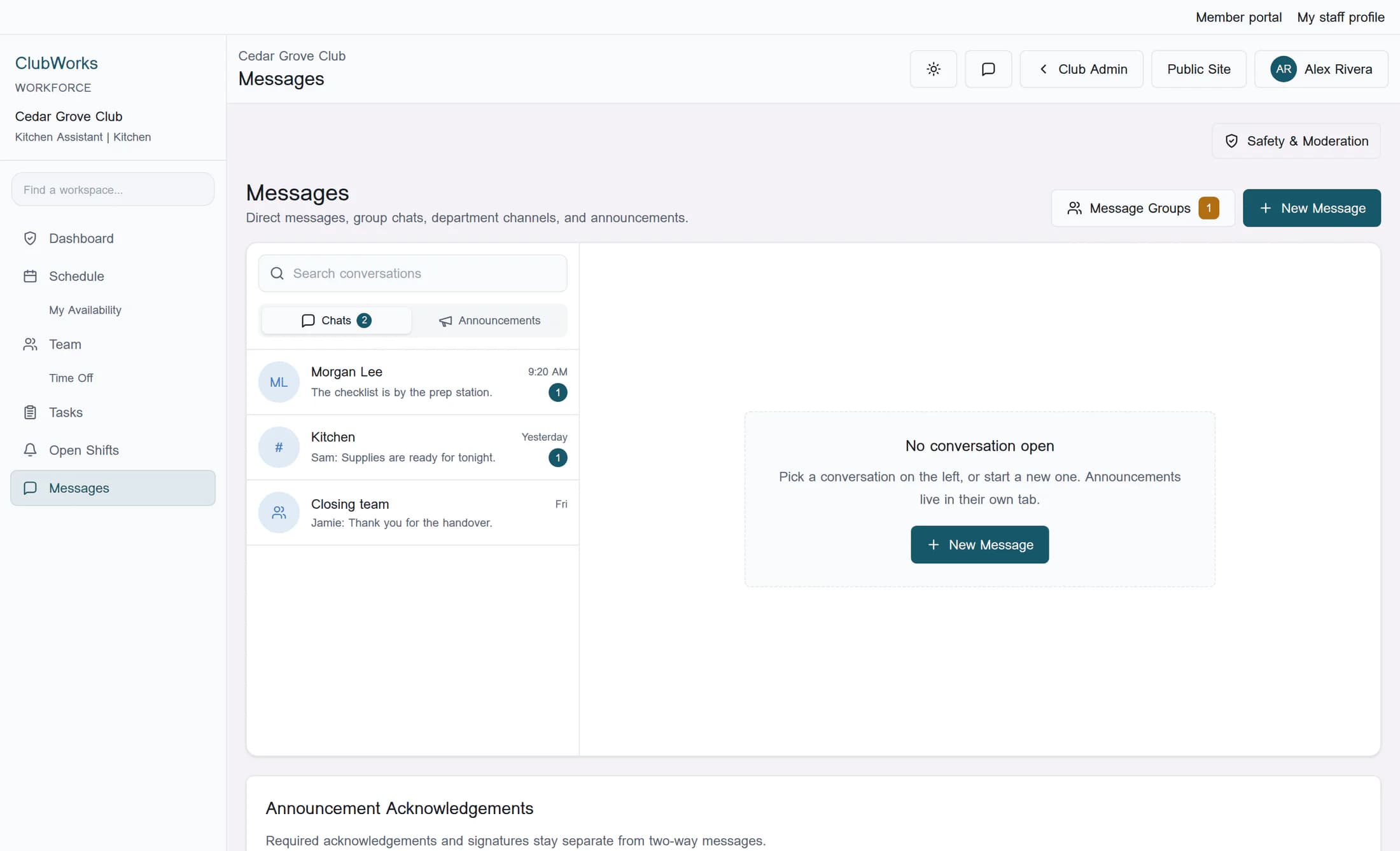
Workforce Messages contains Chats and Announcements. Direct and group chat visibility follows participation, while department conversations have their own access rules; a manager title alone does not grant access to every private conversation. Staff announcements can target All departments or one department, with optional acknowledgement, typed signature, and separate employee push notification.
Member communications separate recipients from channels
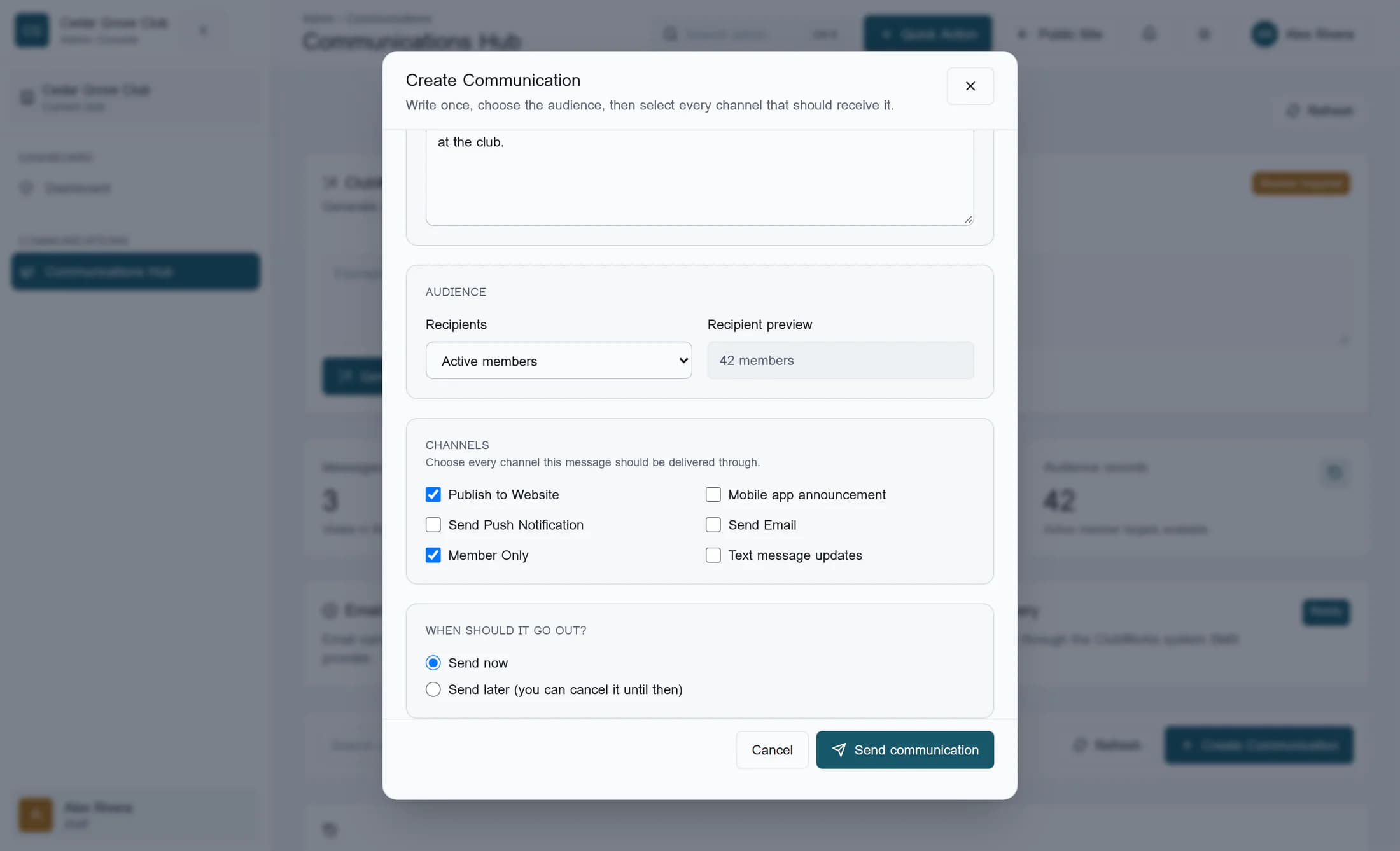
Member Communications and Communications Hub lead to the member communication workspace, where Recipients offers Active members, All members, Officers, Member category, or Custom selected members. Those audiences are membership choices, not employee departments. Channels offers Publish to Website, Mobile app announcement, Send Push Notification, Send Email, and Text message updates independently of the recipient choice.
News visibility is different from a targeted delivery
Member Only controls member-versus-public website copy; it is not a staff-only switch or a restriction to the selected member recipient subset. Member News shows member-audience posts that are published and whose publication time has arrived. A public news publication does not promise delivery to employees or to anyone’s device.
One person can belong to both audiences
A staff member may also hold a club membership, but those identities serve different audiences. A Workforce message is not automatically forwarded into member communications, and a member notice is not automatically duplicated into Workforce. A staff member could receive a member notice because they qualify for its member audience.
Available screens depend on access
Ordinary Workforce self-service uses an account linked to an employee record; manager navigation also depends on assigned permissions. Member communication access and permission to send are separate checks. Seeing member communications does not establish authority to send a member notice.
Reading, acknowledgement, and signature are different results
Opening a conversation or changing its read state is different from completing an employee announcement’s required acknowledgement. A typed signature is another explicit employee action; the announcement tracker distinguishes Pending, Acknowledged, and Signed as applicable. Member delivery counters do not provide that employee acknowledgement or signature result.
What delivery indicators can tell you
- News publication, a mobile announcement record, and notification delivery are separate outcomes. A sent or provider-accepted result does not prove that a person read the content.
- Member preferences, email or text provider readiness, and registered devices can affect delivery. A selected channel is not a guarantee that every intended recipient receives it.
- When push and mobile announcement are both selected, the mobile announcement can reuse the push notification record. They are not always two independent deliveries with identical preference handling.
- Employee push notification is separate from publishing the staff announcement. Neither result completes the employee’s acknowledgement or signature.
Example: a shift handover question
In the fictional Cedar Grove Club, Alex needs to ask Morgan where the closing checklist was left. A staff chat fits the back-and-forth question: a direct conversation for the two colleagues, or an appropriate department conversation if the team needs the answer. Club members do not need the operational discussion.
Example: a staff safety policy
Cedar Grove’s manager needs employees to confirm a new kitchen safety policy. An employee announcement for the relevant department fits the requirement, with acknowledgement or typed signature as appropriate. A chat read indicator or member push result would not establish that the required employee action was completed.
Example: a member dinner notice
Cedar Grove’s dinner notice belongs in member communications, with the intended member audience and suitable channels. A member-only website version serves members; a public website version can inform visitors. Any separate kitchen staffing discussion stays in the relevant Workforce conversation.
Keep the audience and result together
Use staff conversations for coordination, employee announcements for staff broadcasts and required employee responses, and member communications for member audiences. Treat website visibility, channel delivery, reading, and acknowledgement as separate decisions and results.
About this guide
The illustrations are fictional reconstructions of the source-backed classic web screens, using Cedar Grove Club and invented people and messages. They have not been verified in a live club account; permissions, enabled features, and surrounding navigation may differ. They explain the audience distinction and do not show a completed send, acknowledgement, or native-app workflow.
The screens in this guide show example clubs and people. Your club's name, colours and some labels may look different.
