
On this page
- When a purchase becomes a points credit
- What the purchase rate means
- Why a processed check can earn no points
- Eligibility has more than one check
- A retry keeps the first recorded result
- Refunds and voids leave already-sent points alone
- What this does not confirm about register refunds
- An input limit is not a spending policy
- Details that help staff review a mismatch
- Corrections follow your club’s policy
- About this reference
- In short
When a purchase becomes a points credit
The October 21, 2026 integration record describes TabWorks queuing a check when it is first credited, then sending it to ClubWorks during sync. A qualifying credit adds to the member’s balance and lifetime points, with the ledger note “TabWorks purchase.” Processing is queued, so the sale and its points credit need not appear at the same moment.
The ClubWorks purchase endpoint receives a member, check reference and net amount. It does not independently establish that the customer paid; that paid-check responsibility belongs to TabWorks’s sending process.
What the purchase rate means
Purchase points equal the net amount in cents multiplied by the points-per-dollar rate, divided by 100, then rounded down to a whole point. At $12.75 and 1 point per dollar, the result is 12 points—not 13. Rounding happens separately for each check: two $6.50 checks earn 6 + 6 = 12 points at that rate, while one $13.00 check earns 13.
The default rate is 1. The purchase calculation limits the rate to 0–100 points per dollar; 0 turns purchase points off. The net amount is the amount supplied by the register. These sources do not establish a universal rule about whether tax, tips, discounts or particular items are included.
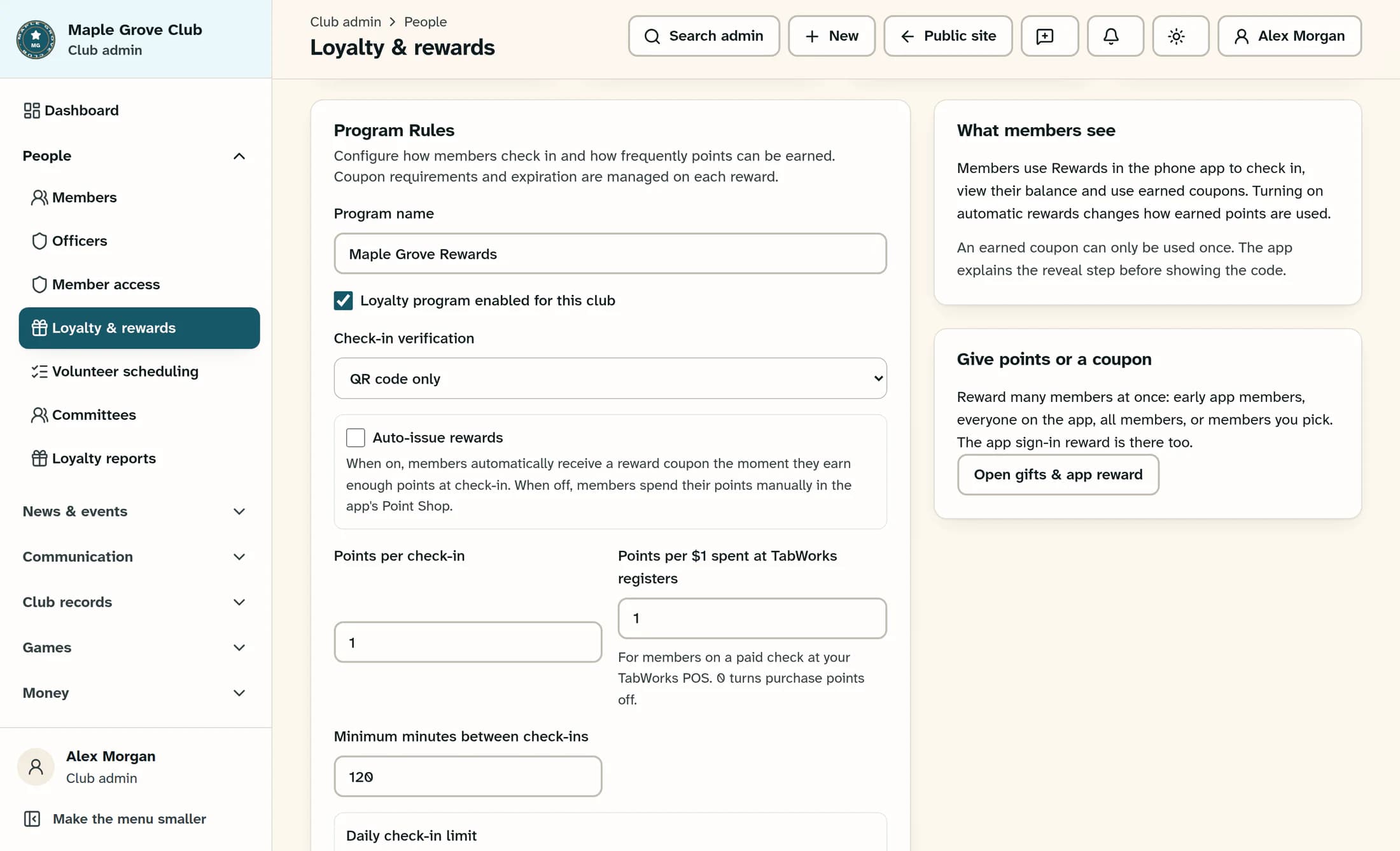
In the newer Clubhouse view, Program Rules includes Points per $1 spent at TabWorks registers. The illustration shows a fictional saved rate of 1. That newer Loyalty view is not enabled by default in the reference release, so your club may have the classic layout without this field; this is an explanation of the rate, not a rate-setting procedure.
Why a processed check can earn no points
A valid check can be recorded as skipped with zero points when the club has no loyalty program or the program is off, membership access is refused, the loyalty account is paused or otherwise not active, or the calculation produces less than one whole point. A zero rate and a zero net amount also produce no points.
“Processed” does not necessarily mean “points awarded.” The bridge records a successful award separately from a skipped result; a missing member in the club or an invalid request is an error rather than an ordinary skipped award.
Eligibility has more than one check
The person must belong to the same club and pass the membership-access check. This is not simply an “active members only” rule: pending or prospect membership status can pass, as can authorized staff. An inactive profile is refused, while ordinary member access also takes inactive, deceased and effective suspension status into account.
Even when membership access passes, the loyalty account must be active to receive the credit. A member’s access status, their loyalty-account status and the club’s loyalty switch answer different questions.
A retry keeps the first recorded result
ClubWorks identifies a purchase by the combination of club and check reference. Once a result is recorded, another request using that same combination returns the original points and skipped reason instead of creating a second award. This includes a check originally recorded with zero points.
A retry therefore does not apply a later rate, turn a previously skipped check into an award, or recalculate a changed amount. Correcting eligibility or turning loyalty on later does not make an already recorded check earn points on replay. Duplicate protection is not a correction or refund mechanism.
Refunds and voids leave already-sent points alone
The dated integration record explicitly says a refund or void at the register does not take back ClubWorks purchase points already sent. For example, a $12.75 purchase credited at 1 point per dollar can retain its 12-point credit after the sale is refunded. The sale record and the points ledger need separate review.
The reviewed sources show no automatic purchase-point reversal or supported purchase-reversal endpoint. They also do not establish automatic coupon restoration. A refund, a points adjustment and restoring a coupon are separate outcomes; one must not be assumed from another.
What this does not confirm about register refunds
The ClubWorks sources and the October 20–21, 2026 integration record do not establish the current TabWorks controls or complete workflows for full refunds, partial refunds, cash refunds or voids. They do not establish payment-provider settlement timing or what a register will show after those actions. This article therefore supplies no register refund instructions.
That is a limit of the available evidence, not a claim that TabWorks cannot perform those tasks. Current register procedures and any correction policy need confirmation from your club’s authorized staff or support. A configured connection or saved points rate alone does not verify that a particular check reached ClubWorks.
An input limit is not a spending policy
The ClubWorks purchase endpoint accepts an integer net amount from 0 through 100,000,000 cents ($1,000,000). This is a technical input cap, not a published customer spending limit, refund allowance or promise that a transaction of that size is supported at the register. Negative amounts are not accepted as purchase credits, so a negative purchase request is not a supported refund method.
The 0–100 rate limit and per-check rounding are calculation rules. They do not define your club’s return policy, item eligibility or authority to correct a member’s balance.
Details that help staff review a mismatch
- Club and member involved, plus the original TabWorks check or reference.
- Original sale time and any refund or void time, including the time zone if relevant.
- Net amount sent, the rate expected at the original processing time, and expected versus actual points.
- Existing points history, including the original purchase credit and any later adjustments; any recorded skipped or replayed result.
- What happened at the register and what remains uncertain, without assuming that a successful refund also reversed points.
Corrections follow your club’s policy
Authorized staff can decide whether a separate correction is appropriate after reconciling the sale and points history. The exact correction policy is club-specific. Reusing the original check reference will preserve its first result; creating another reference just to force a credit risks a duplicate and is not a documented correction procedure.
About this reference
This guide reflects the accepted ClubWorks source from October 21, 2026 and its dated TabWorks integration record. The illustration is a source-based reconstruction with fictional club data. No live register sale, refund, void, points change or end-to-end workflow was performed or verified for this article.
In short
Purchase points use a per-check rounded-down calculation and keep their first recorded result. Refunds and voids do not automatically reverse already-sent points; a mismatch needs a separate review of the sale, eligibility and loyalty history.
